Nintendo eShop Codes: 5 Legit Ways That Work
Updated October 2026 · By the Codes Tappalm team · About us

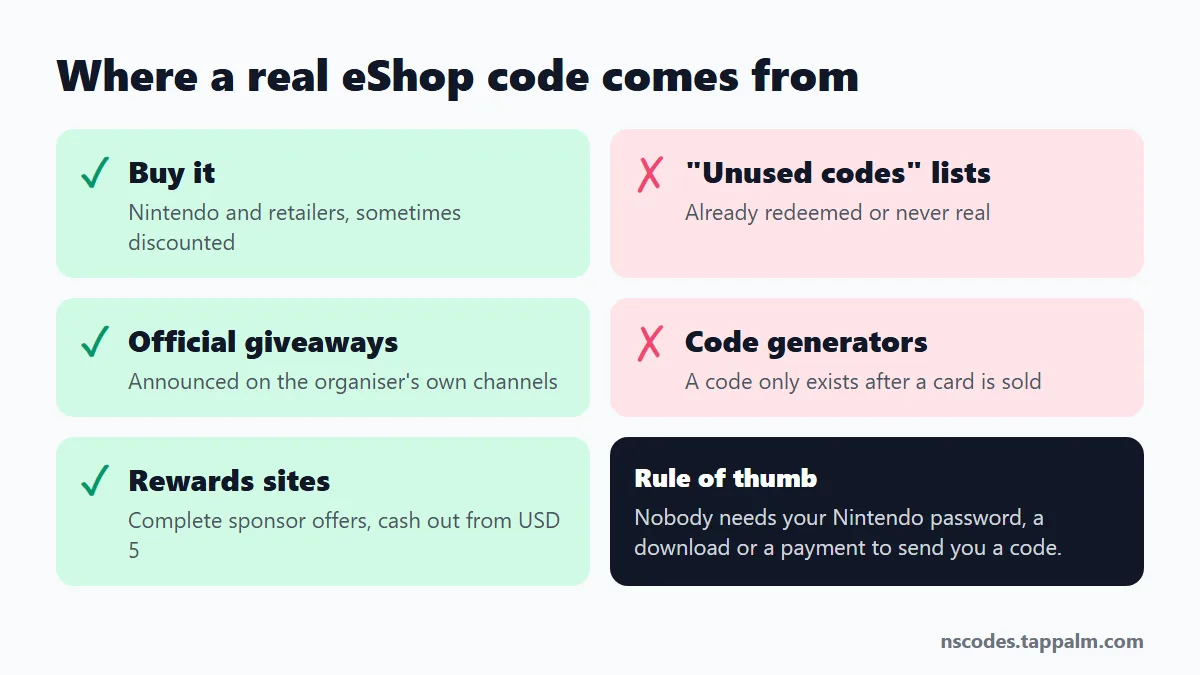
Short answer: there is no public list of free, unused Nintendo eShop codes that works, and no generator can create one. Real Nintendo eShop codes come from five places: you buy them, you win them in an official giveaway, you earn them on a rewards site, you exchange loyalty points for them, or they come bundled with a product. This guide explains each one and how to redeem the code once you have it.
| Source of eShop codes | Does it work? | Cost to you |
|---|---|---|
| Lists of “unused codes” | No. Used or fake | Your time |
| Code generators | No. Often a scam | Risk to your data |
| Retailers (Nintendo, Amazon, supermarkets) | Yes | Face value, sometimes discounted |
| Official giveaways | Yes, if you win | Free |
| Rewards sites such as TapPalm | Yes | Free, paid with your time |
| Loyalty points programs | Yes, where offered | Points you already have |
| Bundles and promotions | Yes | Included with a purchase |
Why Nintendo eShop code lists and generators don’t work
An eShop code is 16 characters long and has no value until a retailer sells the card and activates it. That activation happens on Nintendo’s side, so nobody can guess or calculate a valid code. Each code can also be redeemed only once.
That is why every page of “unused codes” fails. Either the codes were invented, or they were real and someone redeemed them minutes after they were posted. Generators go one step further: they ask you to complete a “verification”, install an app or enter account details before showing a code that does not exist.
We know how the codes work because we buy eShop cards every time a member cashes out. We do not publish code lists and we do not run a generator; it is the first line of our About page.
Free Nintendo eShop codes: do they exist?
Yes, but not as a list you can copy. A free code is one that somebody else paid for and gave to you for a reason: a giveaway prize, a reward for completing sponsor offers, or points you collected in a loyalty program. In every real case you can name who paid for the card. If you cannot, the code is not real.
5 legit ways to get Nintendo eShop codes
1. Buy a Nintendo eShop gift card, ideally at a discount
Nintendo sells the digital Nintendo eShop gift card directly, and so do large retailers. Some retailers and warehouse clubs occasionally sell cards below face value. If you were going to buy a game anyway, a discounted card is the simplest saving. Pair it with a sale, like the eShop sale with games up to 90% off, and the balance goes further.
2. Official giveaways
Nintendo, publishers and gaming outlets run giveaways from time to time. Only trust one that is announced on the organiser’s own website or verified account, and that never asks for your Nintendo password.
3. Earn them on a rewards site
Rewards sites, also called get-paid-to sites, pay you for completing offers from advertisers: trying an app, reaching a level in a mobile game, answering a survey. The advertiser pays the site, and the site passes part of that on to you. The best known ones are Swagbucks and Freecash. We compare them in the best GPT sites for gamers.
Our own is TapPalm. You build a balance in US dollars and withdraw from USD 5. Nintendo eShop cards are available for these regions:
| Region of your Nintendo Account | eShop card amounts |
|---|---|
| United States | USD 5, 10, 20 |
| United Kingdom | GBP 15, 25 |
| Eurozone | EUR 15, 25 |
| Canada | CAD 10 |
It is not instant and it is not a way to get rich. A few small offers add up slowly; one longer game offer can cover a USD 5 card on its own. Withdrawals are reviewed by hand and paid within 14 days for new accounts.
See what is available in your country
Three quick questions. No card, no download, no password of any gaming account.
4. Exchange loyalty points you already have
Some bank, credit card and retailer points programs let you exchange points for gift cards, and in some countries the catalogue includes Nintendo eShop cards. Check the rewards catalogue of the programs you already use before spending money.
5. Bundles and promotions
Console bundles, some physical products and seasonal promotions include a code in the box. These are usually download codes for one specific game or item rather than eShop balance, but they are redeemed in the same place.
Nintendo eShop gift card, eShop code and download code
People use “Nintendo eShop codes”, “Nintendo Switch codes” and “Nintendo redeem code” for two different things:
- Nintendo eShop gift card: also called an eShop card. Its code adds money to your Nintendo Account balance. You spend it on any game, DLC or subscription in Nintendo eShop.
- Download code: unlocks one specific product, such as a game, a DLC pack or a Nintendo Switch Online membership.
Both are 16 characters long and both are entered on the same Redeem Code screen.
How to redeem a Nintendo eShop code
- Open Nintendo eShop on your console and choose your account.
- Select Redeem Code in the menu (on older system versions it is called Enter Code).
- Type the 16 characters and confirm. The balance is added to your account at once.
You can also redeem from a browser on Nintendo’s official redeem page while signed in to your Nintendo Account. The steps are the same on Nintendo Switch and Nintendo Switch 2.
Looking for Android instead? See our guide to getting a free Google Play gift card.
Nintendo eShop code not working? Common reasons
- Wrong region. A card for one country does not redeem on an account set to another. This is the most common cause.
- Typing mistake. Check look-alike characters and enter the code again without spaces.
- Already redeemed. If the code came from a list or a stranger, someone used it first.
- Card not activated. A physical card that was not scanned at the till has no value. The shop that sold it has to fix that, with your receipt.
How to spot a fake eShop codes offer
- It asks for the password of your Nintendo Account. Nobody needs it to send you a code.
- It asks you to download a “generator” or any program.
- It asks you to pay to “unlock” or “activate” a code.
- It shows a list of codes “updated today”. Real codes are never public.
Questions about Nintendo eShop codes
Are there free Nintendo eShop codes that work?
Not in public lists. A code that has been posted online has either been used already or was never real. The free Nintendo eShop codes that do work are the ones you earn or win yourself: from a rewards site, an official giveaway or a promotion.
Do Nintendo eShop code generators work?
No. A valid code only exists after a card has been sold and activated by the retailer, so a program cannot create one. Generators exist to collect your data, show you ads or install software.
What does a Nintendo eShop code look like?
It is 16 characters long, made of letters and numbers. It is printed under the scratch-off panel of a physical card or sent by email when a digital card is bought.
Why do “unused eShop codes” lists never work?
Each code can be redeemed once. If a real code is ever published, the first person who enters it takes the balance, and everyone after that gets an error.
Do Nintendo eShop codes work on Nintendo Switch 2?
Yes. The balance is added to your Nintendo Account, so it can be spent in Nintendo eShop on both Nintendo Switch and Nintendo Switch 2.
Can I use a US eShop code on an account from another country?
No. eShop cards are tied to a region. A card bought for the United States only redeems on a Nintendo Account set to the United States.
How long does it take to earn an eShop code on TapPalm?
It depends on the offers you pick. Some take a few minutes and pay cents; game offers that ask you to reach a level pay more and take days. You can withdraw from USD 5, and payouts are reviewed by hand: within 14 days for new accounts.
Disclosure
Codes Tappalm is not affiliated with Nintendo. We earn a commission from sponsors when you complete an offer on TapPalm and share part of it with you as your reward. Gift cards are bought at face value and passed on to you. Questions: contact us.